Say it once.
Your task is ready.
Speak it, snap it or type it. TimeMind fills in the title, time, reminder and category, and puts it on your day.
No sign-up needed to start. For iPhone and iPad with iOS 26 or later.
Design team sync tomorrow at 3pm, remind me ten minutes before
- Title
- Design team sync
- When
- Tomorrow, 3:00 PM
- Reminder
- 10 min before
- Category
- Work
Capture it, schedule it, get it done together.
No need to format anything first. Get it down, and TimeMind puts it on the right day and time.
-
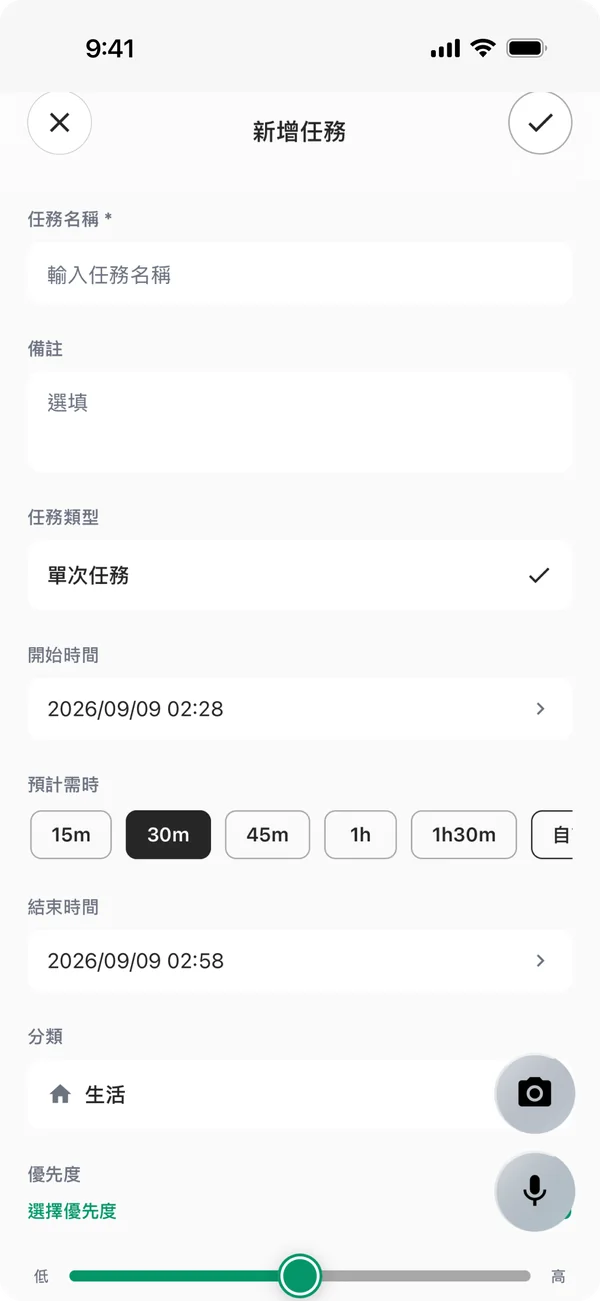
Capture it the moment you think of it
Tap the mic and say it, snap a poster or screenshot, or fill in the form. Set start and end times, duration, reminders, category and priority.
-
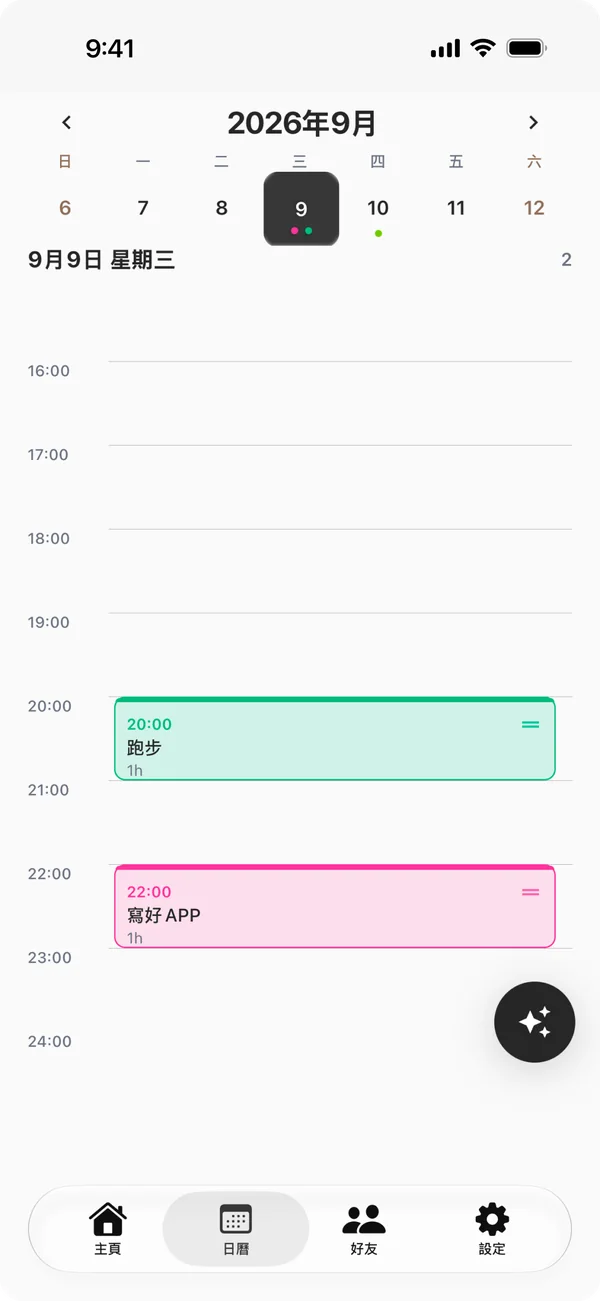
Plan it on the calendar
See your whole day on the day and week timelines. Drag a task to reschedule it, and sync both ways with Apple Calendar.
-
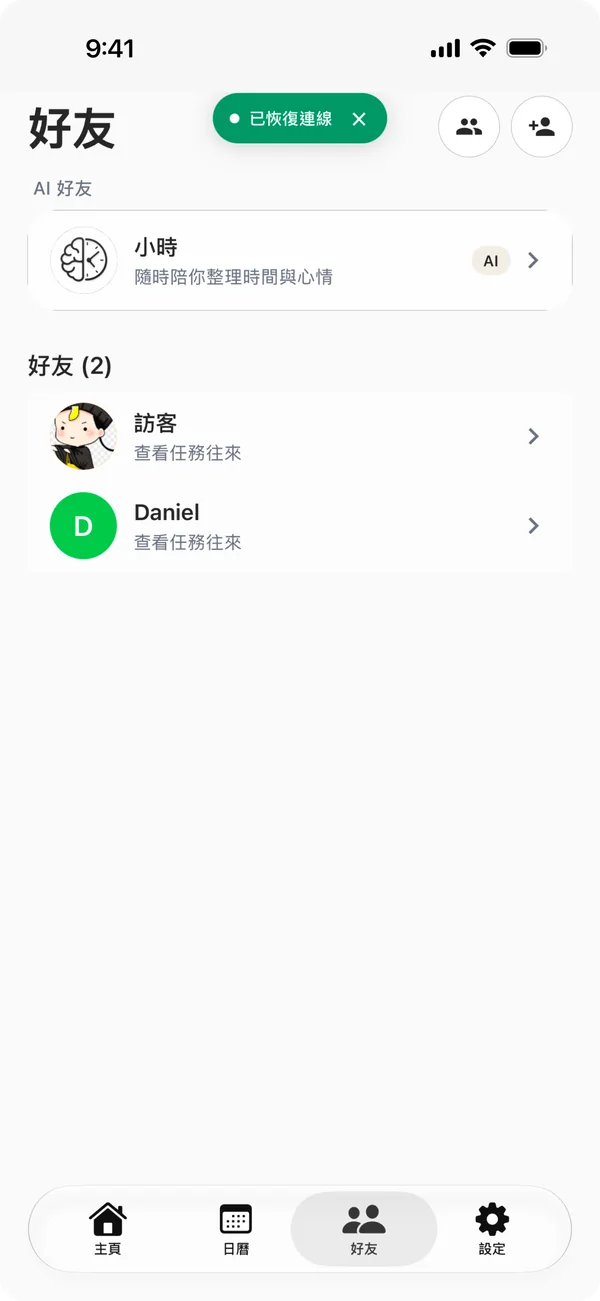
Get it done with friends
Share a task with a friend and get notified when they finish it. You can nudge them too.
Details you’ll use every day
- Recurring tasks
- Repeat daily, on chosen weekdays, monthly or yearly. When you edit, change just this one, this and future ones, or all of them.
- Nothing overdue slips by
- Overdue tasks sit at the top of Home. Move them to today or push them back in one tap; finished tasks fold into Completed.
- Lock Screen and widgets
- See a countdown on the Lock Screen and in the Dynamic Island, and today’s tasks in a Home Screen widget.
- Siri and Spotlight
- Create tasks with a Siri shortcut and find them in Spotlight.
- History and year in review
- Pull down on Home to look back at past tasks, and get a year in review at the end of each year.
- 53 languages and regions
- The app is available in 53 languages and regions, including English, Traditional and Simplified Chinese, Japanese and Korean.
Coming soon
Sneak peek: Xiao Shi gets a face
The next TimeMind update gives our AI friend Xiao Shi a mascot, and redesigns the Dynamic Island, Lock Screen and Home Screen widgets.
- Xiao Shi’s face follows what’s happening: its clock-hand antenna spins while it thinks and rings like an alarm when time’s up.
- The Dynamic Island and Lock Screen show your countdown and time left, with Pause and Done right there.
- Check off tasks straight from Home Screen widgets. When everything’s done, Xiao Shi celebrates with you.
The video shows the new design. The app may look slightly different after the update.
Stuck? Talk it through with Xiao Shi
Xiao Shi is the AI friend inside TimeMind. It can see today’s tasks, chats when you want to chat, and helps you pick the easiest one to start when you’re stuck.
- Matches your tone: serious when you are, playful when you are.
- Only suggests. It never adds or changes your tasks on its own.
- Asks for your consent before your chats are sent to cloud AI.
 Xiao ShiAI friend
So tired today. I don’t feel like doing anything.
Then start with the smallest one. Reply to Mark’s email? That’s five minutes.
OK, doing that first
Tell me when it’s done, and we’ll plan the rest later.
Your tasks stay on your phone by default.
You can use TimeMind without an account. Content leaves your device only for AI or sync, and only after you agree or turn it on.
Stays on your device
Stored in the app’s sandbox, never on our servers.
- Tasks, categories and preferencesIn guest mode or with sync off, everything stays on this device.
- Voice recordings on iPhone and iPadTranscribed by Apple’s on-device speech recognition and never uploaded.
- Photo attachments and voice memosKept inside the app, and you can delete them any time.
Sent only with your consent
You can turn off each one or withdraw consent in Settings.
- Transcripts, task text and Xiao Shi chatsSent to DeepSeek to build tasks and replies. Requests don’t include your email.
- Photos you chooseSent to Google Gemini to find the tasks in them.
- Cloud sync (Pro)Tasks are stored encrypted on Supabase, so you get them back on a new phone.
- We don’t sell data
- No ad tracking
- Export to JSON
- Delete your account and all data in the app
Free to use. Upgrade when you need more.
| FreeFree forever | ProSubscription or one-time purchase | |
|---|---|---|
| Tasks, reminders, calendar and recurring tasks | Everything | Everything |
| Voice task creation | 50 a month | 1,000 a month |
| Photo analysis | 5 a month | 100 a month |
| Cloud sync | Not included | Included |
Counts reset on the 1st of each month and don’t roll over. Prices for your region are shown on the App Store, and you can cancel a subscription any time in the App Store.
Questions
Do I need an account?
No. You can start right away in guest mode — your tasks stay on this device. If you sign in or create an account later, your guest tasks move to that account. Subscribe to Pro and turn on cloud sync to get your tasks back on a new phone.
Which languages does voice input support?
Voice input uses Apple’s on-device speech recognition. Supported languages depend on your iOS version and device and include Chinese (Mandarin, Cantonese), English, Japanese, Korean, Spanish, French, German, and many more. In Settings → Voice & AI Language, choose the recognition language and the language AI uses to write your tasks.
What’s the difference between one-time and recurring tasks?
A one-time task happens once, with its own date and deadline. A recurring task repeats on the rule you choose — daily, weekly (on the days you pick), monthly, or yearly — with a reminder each time. When you edit or delete a recurring task, you can apply the change to just that one, this and future ones, or all of them.
How do I delete my account?
At the bottom of Settings, tap “Delete Account & Data”. Once you confirm, your account, cloud data, and the data on this device are deleted; for accounts that use Sign in with Apple, TimeMind’s access is revoked too. Deleting your account doesn’t cancel an App Store subscription — cancel it in your App Store subscriptions.
Get today’s tasks out of your head.
Android APK (beta)
Install and open the app to get started. It is still in testing and is not yet available on Google Play.
Connect to the internet to get the in-app update for Google sign-in. If it has not appeared, fully close and reopen the app. Purchases and friend push notifications are not yet configured.
Android uses your phone’s speech service first; that service determines whether it connects to the internet. We ask for your consent before using Tencent Cloud as a fallback.
Apple Calendar, widgets and Siri features are available only on iPhone and iPad.
Version 1.2.2 (5) · Built · 79.4 MB